
SQL to dbt guide: Slowly Changing Dimensions with dbt Snapshots
Time travel for your data. Tracking how campaigns and customers evolve over time.

Hi there! Alejandro here 😊
Suscribe if you like to read about technical data & AI learnings, deep dives!
Enjoy the reading and let me know in the comments what you think about it 👨🏻💻
📝 TL;DR
SCD2 tracks how data changes over time instead of just keeping the latest version. Use it when historical context drives business decisions
Two snapshot strategies: timestamp captures all changes (campaign metrics that update daily), check tracks specific column changes (visitor segment transitions)
Snapshots come with real costs: storage growth, query complexity, and maintenance overhead
If you want to get more context on the dbt project use for these articles:


Most data teams reach for SCD2 patterns without asking the fundamental question: do you actually need historical tracking?
In the sql-to-dbt-series repo, there are two clear use cases where the answer is yes.
Campaign performance evolution: ROAS, conversion rates, and budget utilization change daily. Marketing managers need performance trends over time, not just today’s snapshot.
Visitor segment transitions: Customers evolve from prospects to VIP buyers. Understanding these lifecycle transitions helps predict behavior and optimize targeting.
If your analysis only cares about current state, save yourself the complexity.

Two Snapshot Strategies
dbt snapshots detect changes in two ways. Your choice depends on what triggers historical tracking.
Timestamp: When Records Change
`snap_campaign_performance.sql` uses the timestamp strategy. Every time the source data updates, dbt captures a new historical record:
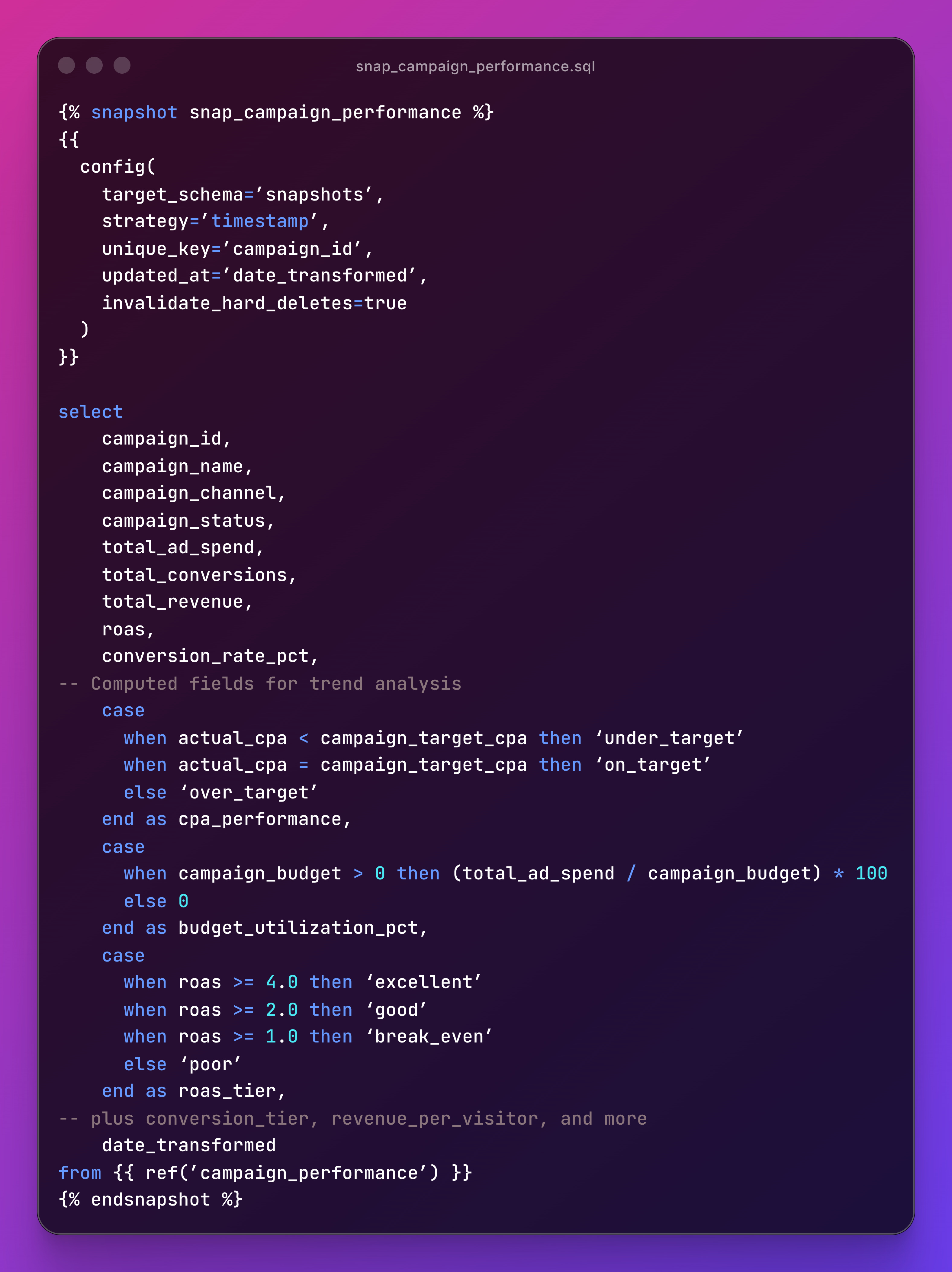
Timestamp strategy works when you have a reliable `updated_at` column and want to capture every change. Campaign metrics move daily. This is the right fit.
Check: When Specific Columns Change
snap_visitor_segments.sql uses the check strategy. dbt only creates a new record when specific columns actually change:
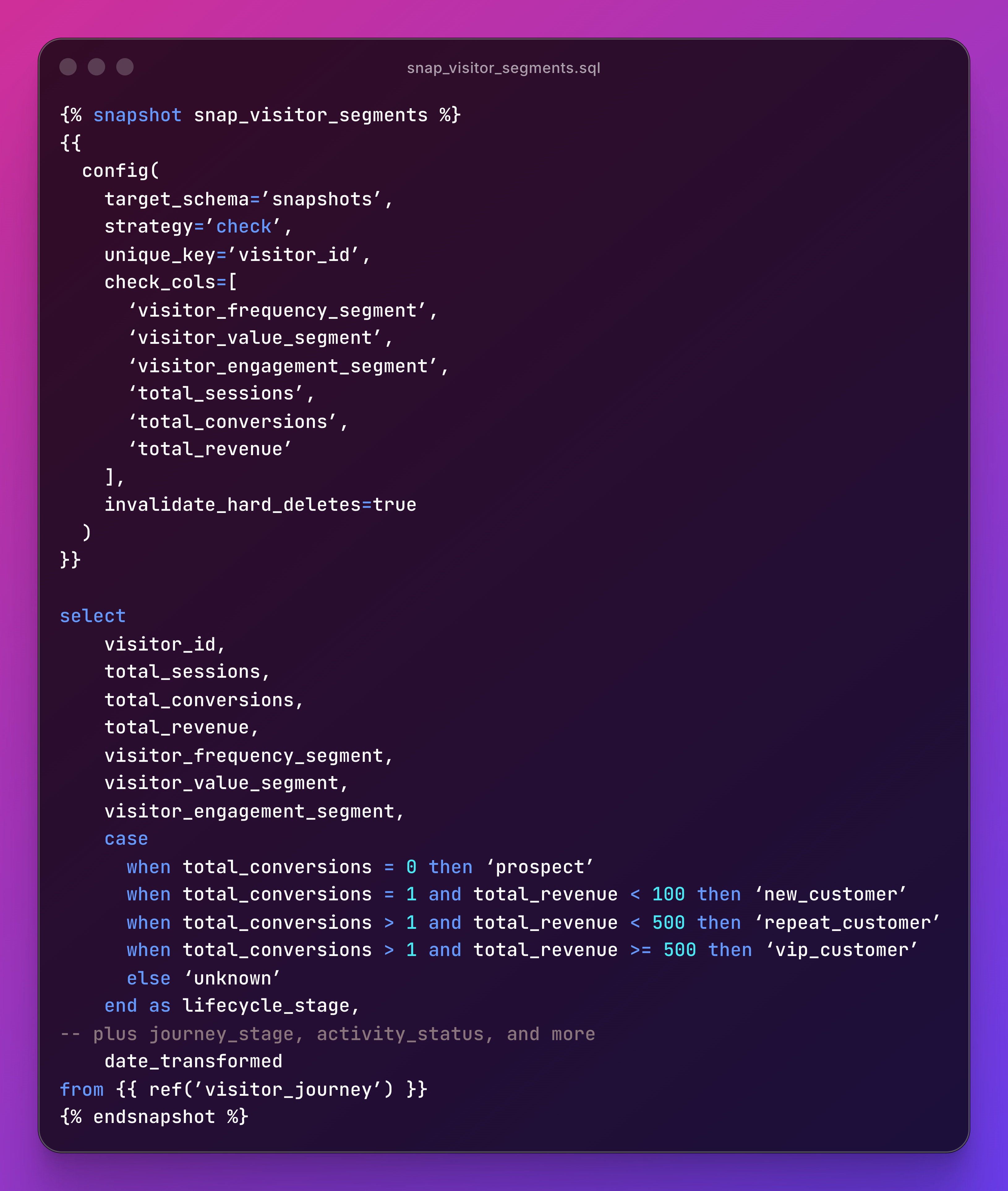
Check strategy is the right call when you care about specific attribute transitions, not every data update.
If a visitor’s page view count increases but their segment stays the same, no new snapshot record.
The strategy-to-use-case mapping is the core lesson: timestamp for metrics that change frequently and where every change matters, check for categorical shifts where you’re tracking transitions.
Querying Historical Data
Snapshots create three special columns: dbt_valid_from (when this version became active), dbt_valid_to (when it was superseded, NULL for current), and dbt_updated_at (when dbt processed it).
Current state - get the latest version of each record:
select *
from snapshots.snap_campaign_performance
where dbt_valid_to is null
Point-in-time - what did the data look like on a specific date:
select *
from snapshots.snap_campaign_performance
where ‘2024-01-15’ >= dbt_valid_from
and (’2024-01-15’ < dbt_valid_to or dbt_valid_to is null)
Trend analysis - track changes over time with window functions:
select
    campaign_id,
    campaign_name,
    dbt_valid_from,
    roas,
    roas_tier,
    lag(roas) over (partition by campaign_id order by dbt_valid_from) as previous_roas
from snapshots.snap_campaign_performance
order by campaign_id, dbt_valid_from
These three patterns cover most analytical needs.
Current state for dashboards, point-in-time for compliance, trend analysis for optimization decisions.
The Costs and When to Skip It
SCD2 is not free. Before snapshotting everything, understand the trade-offs:
Storage: A campaign that changes daily creates 365 records per year. Multiply by thousands of campaigns.
Query complexity: Historical queries require date filters and window functions. Not every analyst is comfortable with these.
Processing time: Every `dbt snapshot` run compares current data against all historical records.
Maintenance: Snapshot schemas need monitoring. The repo includes a `snapshots/schema.yml` with column descriptions and `not_null` tests on key identifiers. Treat snapshot documentation the same as any other model.
You probably don’t need SCD2 if your analysis only looks at current state, historical changes happen infrequently, or storage costs outweigh analytical value.
You definitely need SCD2 if compliance requires audit trails, business decisions depend on trend analysis, or customer lifecycle analysis drives strategy.
Mitigation helps: use
invalidate_hard_deletes=trueto handle deleted source records, consider archiving old snapshots after defined retention periods, and create mart models that pre-calculatcommon historical analyses.
If you enjoyed the content, hit the like ❤️ button, share, comment, repost, and all those nice things people do when like stuff these days. Glad to know you made it to this part!

Hi, I am Alejandro Aboy. I am currently working as a Data Engineer. I started in digital marketing at 19. I gained experience in website tracking, advertising, and analytics. I also founded my agency. In 2021, I found my passion for data engineering. So, I shifted my career focus, despite lacking a CS degree. I’m now pursuing this path, leveraging my diverse experience and willingness to learn.