
Building a Substack Agent with SKILLs and MCP
I built an Agent with SKILLs and MCP that analyzes my own Substack. Here’s the full breakdown of the project, how it works, and what I learned.

Hi there! Alejandro here 😊
Subscribe if you like to read about technical data & AI learnings, deep dives!
Enjoy the reading and let me know in the comments what you think about it 👨🏻💻
📝 TL;DR
Built a Substack content strategy agent using Agno, Claude Haiku 4.5, remote MCP tools, and 5 SKILLs that load on demand.
SKILLs tell the agent **how and when** to use MCP tools, not just what they do. This is the real power.
The agent connects to a deployed Substack Author MCP server, so no local setup for tools.
AgentOS wraps the agent into an MCP server itself, so other AI clients can use it.
Opik + OpenTelemetry trace every run, tool call, and skill activation for observability.
After writing about what SKILLs are and why they matter, I wanted to put the theory into practice with a real project.
I already had Substack Author MCP deployed with 6 tools to fetch articles, notes, comments, and performance metrics.
The tools worked great inside Claude Code and Cursor, but I was always prompting the same patterns:
“Fetch my last 20 notes, rank them by engagement, and tell me what worked”
“Get my 5 most recent articles, analyze the writing style”
“Look at the comments and tell me what readers want”
Same workflows. Every time. Manually explained.
That’s exactly what SKILLs solve.
The Agent Architecture
The agent has 3 layers:
MCP Tools = what the agent CAN do (fetch articles, get performance metrics, read comments)
SKILLs = HOW and WHEN to use those tools (analysis frameworks, output formats, orchestration logic)
System Prompt = WHO the agent is (just identity, nothing more)
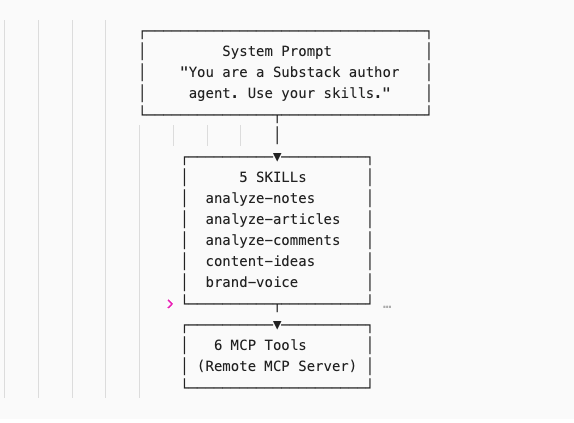
The system prompt is ONE line. Compare that to the 50+ line prompts I wrote about in Learnings From 1 Year of Building AI Agents.
SKILLs move the orchestration logic out of the system prompt and into on-demand files. The agent only loads them when it recognizes the right context.
The Agent Setup
The 55 lines of code with all the power live in agent.py. That’s it. The entire agent. Let’s break it down:
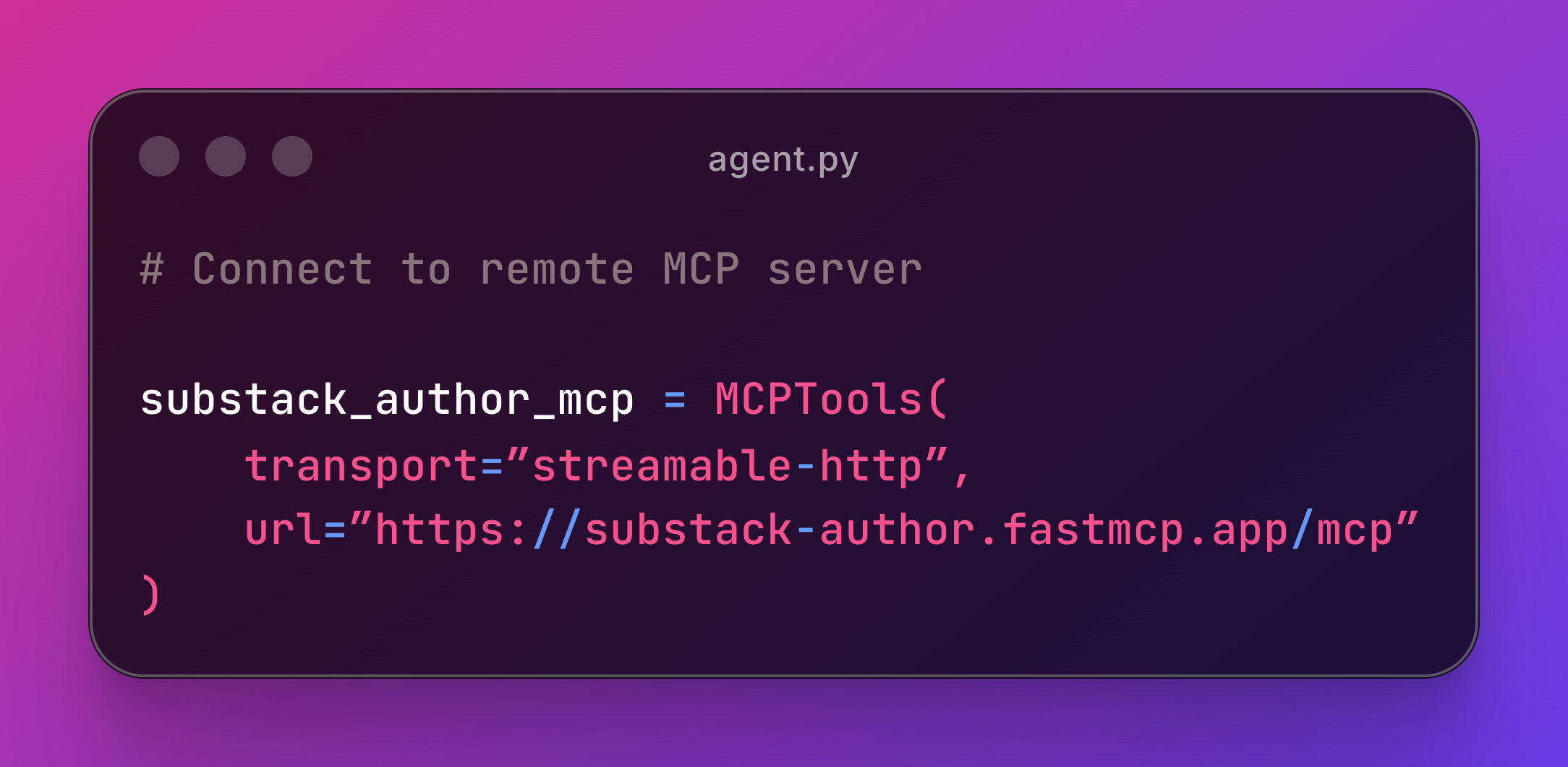
MCP Integration
It works via streamable-http. No local server needed. The tools are already deployed so the agent can fetch notes, articles, analyze performance and engagement across substack content of a publication.
Agent & SKILLs
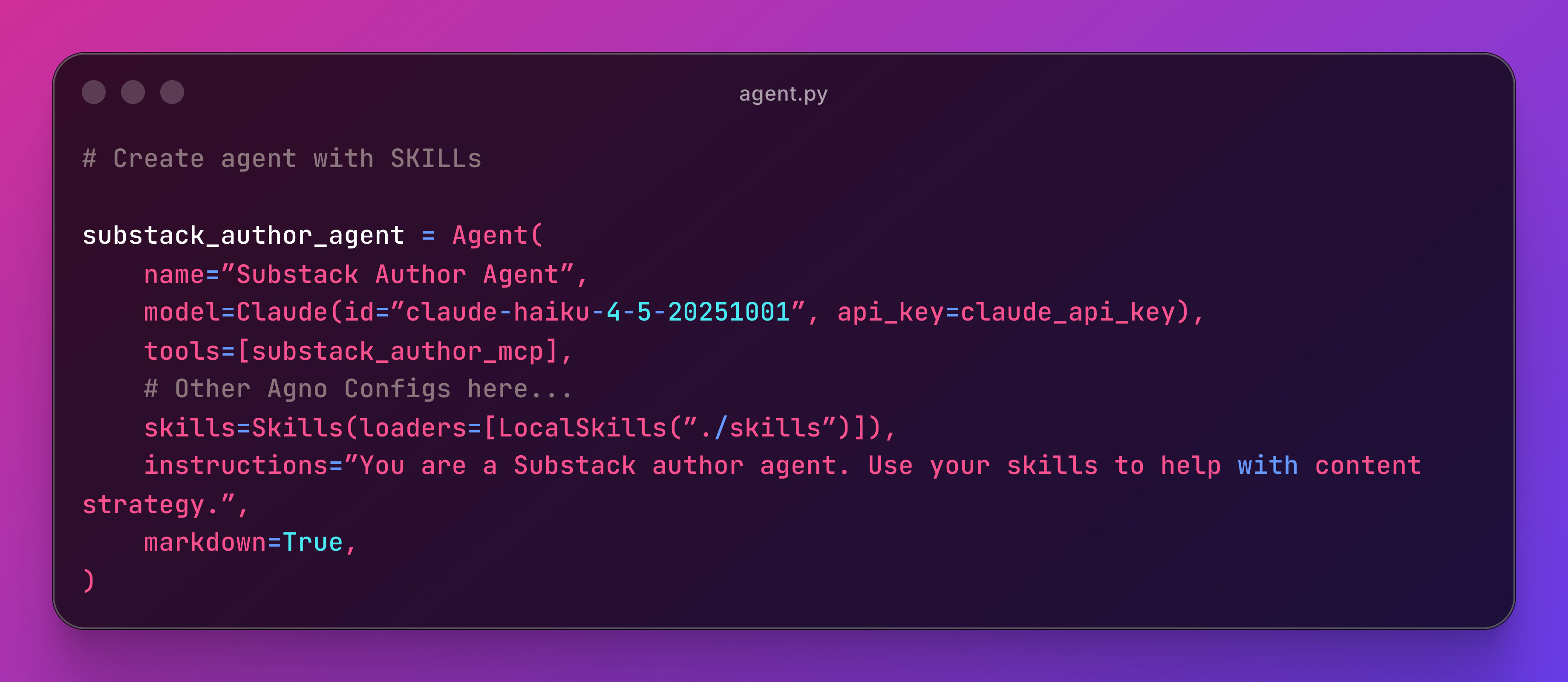
This snippet glues everything together:
The
model(brain)The
tools(MCP)The
instructions(system prompt)Some other config such as memory, session handling, etc
With
LocalSkills(”./skills”)the agent loads all 5 SKILLs from the directory. It works the same way as Claude Code. The agent reads frontmatter descriptions and decides when to activate each one.
Resources: Agno Skills
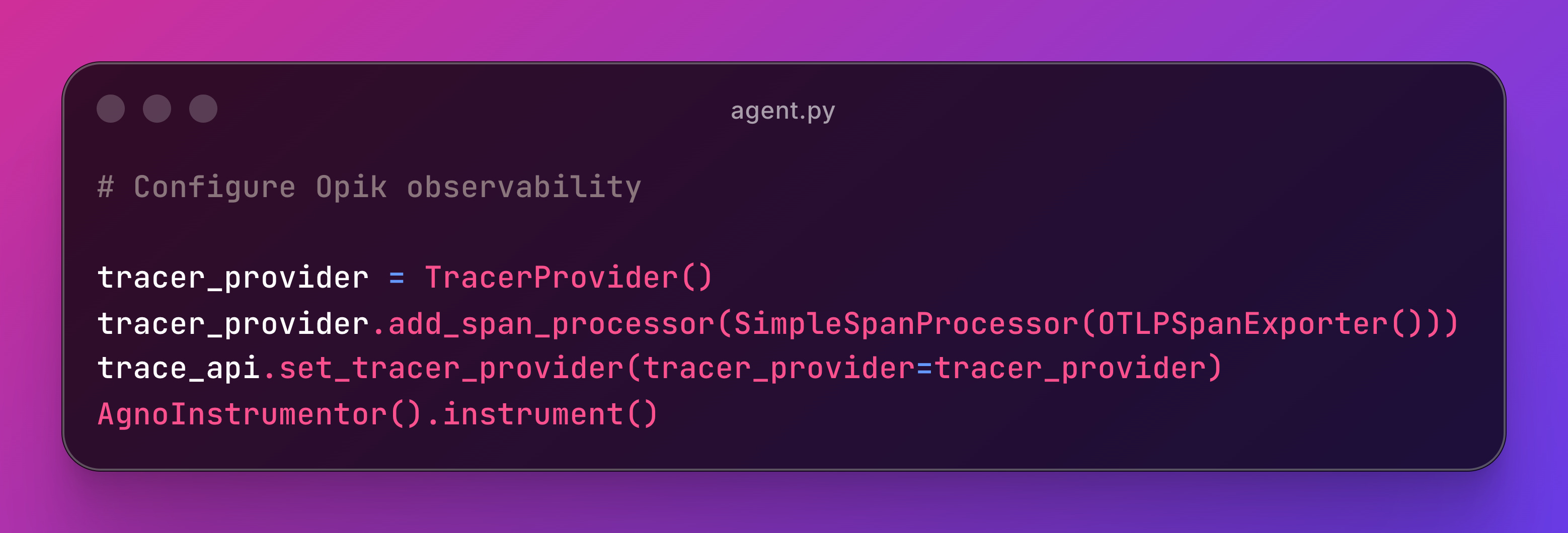
Observability with Opik
This snippet configures Agno to emit OpenTelemetry spans to Opik.
What you see in Opik:
Traces for each conversation turn
Spans for each MCP tool call (which tool, what input, what output)
Skill loading visible in the trace metadata
Token usage and latency per call
🔎 Coming Soon: Intro to AI Observability with Opik
Recommended: Behind the Scenes of AI Observability in Production
The Agent SKILLs
Each SKILL lives in skills/<name>/SKILL.md. Let’s look at one in detail.
analyze-notes - Note Performance Analysis
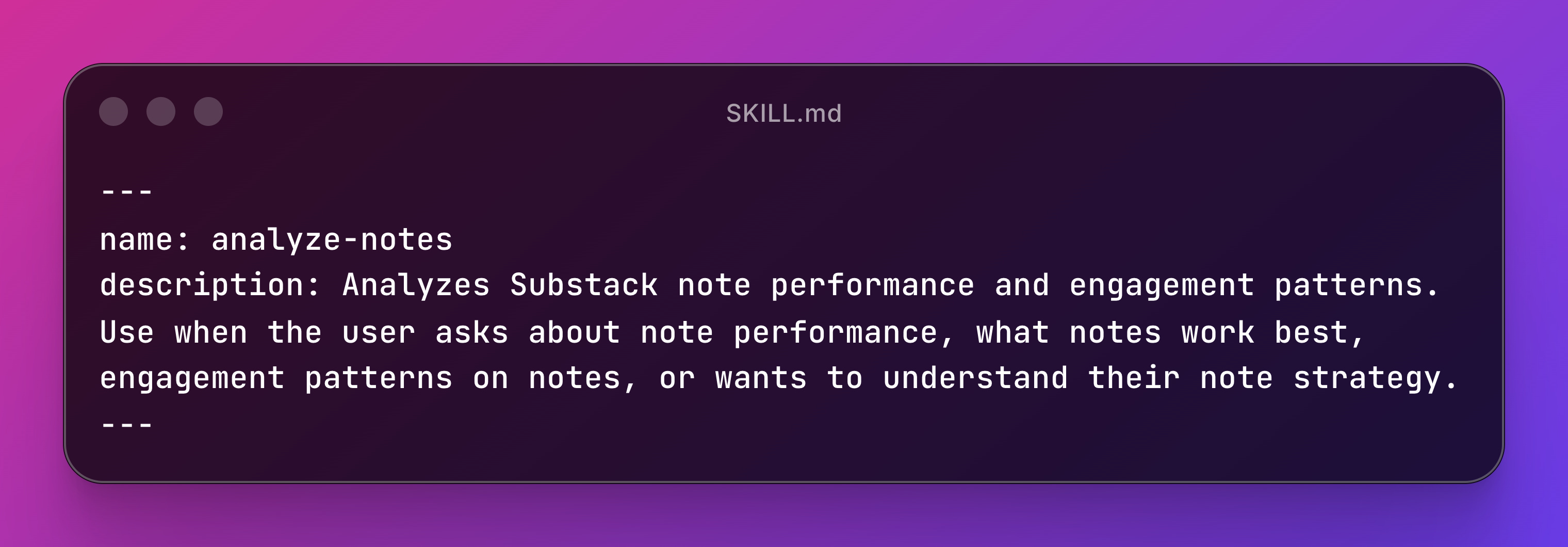
The description is what the agent reads to decide whether to load the skill. It’s the most important part. Get it wrong and the skill never fires.
The body tells the agent HOW to work:
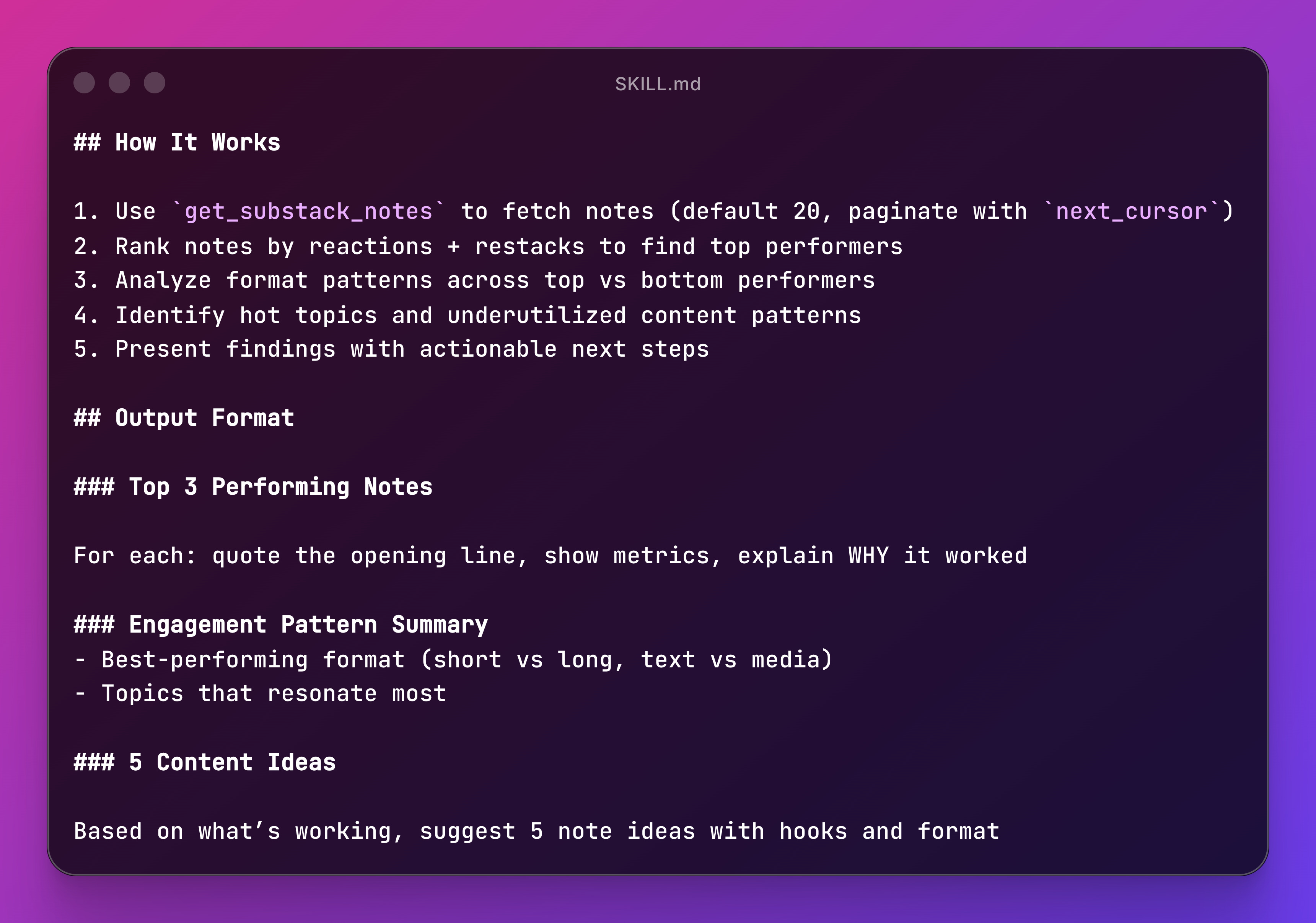
The skill tells the agent which MCP tool to call, what data to extract, how to rank results, and what output format to use.
That’s the difference between a tool description and a SKILL.
The tool says “I fetch notes.”
The skill says “fetch 20 notes using pagination, rank them by reactions + restacks, compare formats, and give me the top 3 with explanations.”
You can find the rest of the skills in the repo.
SKILLs Best Practices
Descriptions make or break your skill. The agent decides whether to load it based on the frontmatter description alone. Be explicit about trigger phrases (”use when the user asks about...”). Define clear output formats and edge cases handling to avoid silent failures.
Tell the agent which tools to call. Don’t assume it’ll figure it out. “Use
get_substack_notesto fetch notes” is better than “fetch the notes.”The system prompt becomes trivially simple. One line of identity. Everything else lives in skills. Compare this to the 1000-line system prompts I used to write.
MCP + SKILLs is the combo. MCP gives you the tools. SKILLs tell the agent how to use them. Together they replace massive system prompts with modular, testable pieces.
Recommended: What’s the real deal about SKILLs (This is not an ‘MCP is dead’ post
Seeing It In Action
Let’s walk through what actually happens when you ask the agent to do something.
The User Message
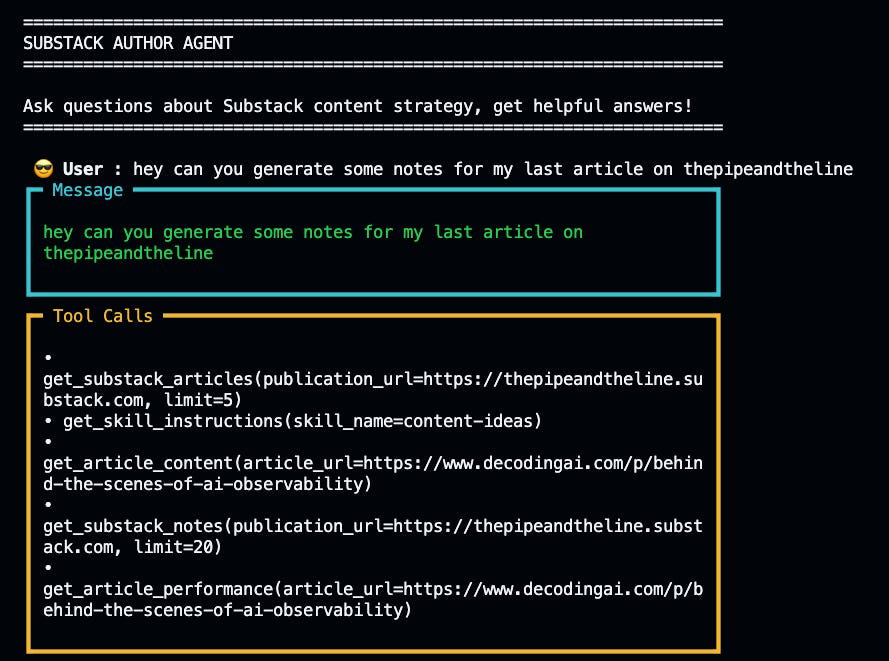
This is the promise of SKILLs: you describe what you want, and the agent figures out which skill to load and which tools to call.
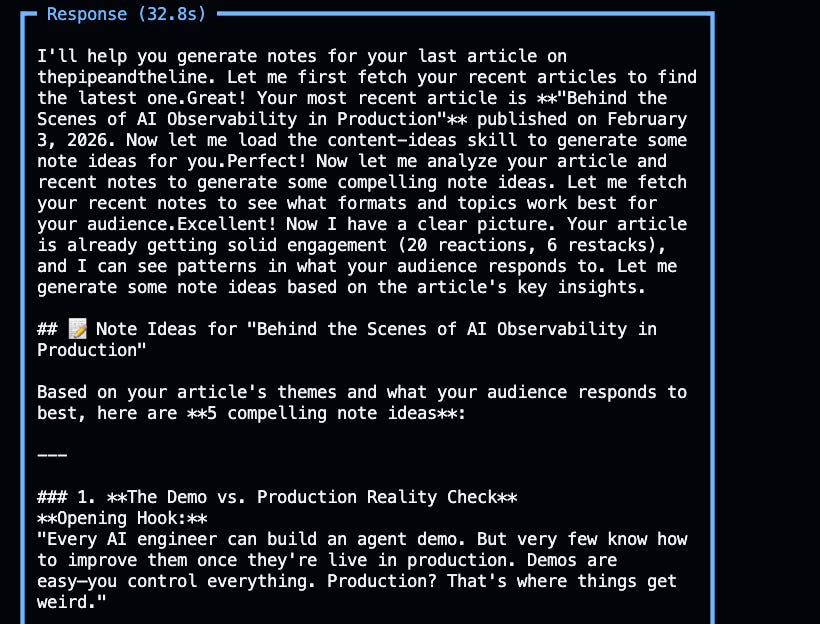
The agent response shows the full orchestration:
Skill Recognition: The agent matches `content-ideas` skill based on the skill’s description.
Skill Loading: It calls `get_skill_instructions` to fetch the full `SKILL.md` file with the complete workflow.
Tool Orchestration: Following the skill’s instructions, it calls:
get_substack_articlesto fetch recent articles.get_article_contentto read full article text.get_substack_notesto analyze what note formats are working.get_article_performanceto rank by engagement.
Analysis & Output: The skill defines the output format, so the agent structures the response consistently: engagement analysis, content gaps, 5 specific note ideas with hooks.
Observability: The Full Trace
Opik captures the entire conversation as a trace. You see:
User message at the top
Agent reasoning (which skill to load)
Tool calls (which MCP tools were invoked)
Responses (what data came back)
Final output (structured content ideas)
Each conversation turn becomes a trace. Each tool call becomes a span. This matters when debugging: did the agent load the right skill? Did it call the right tools in the right order?
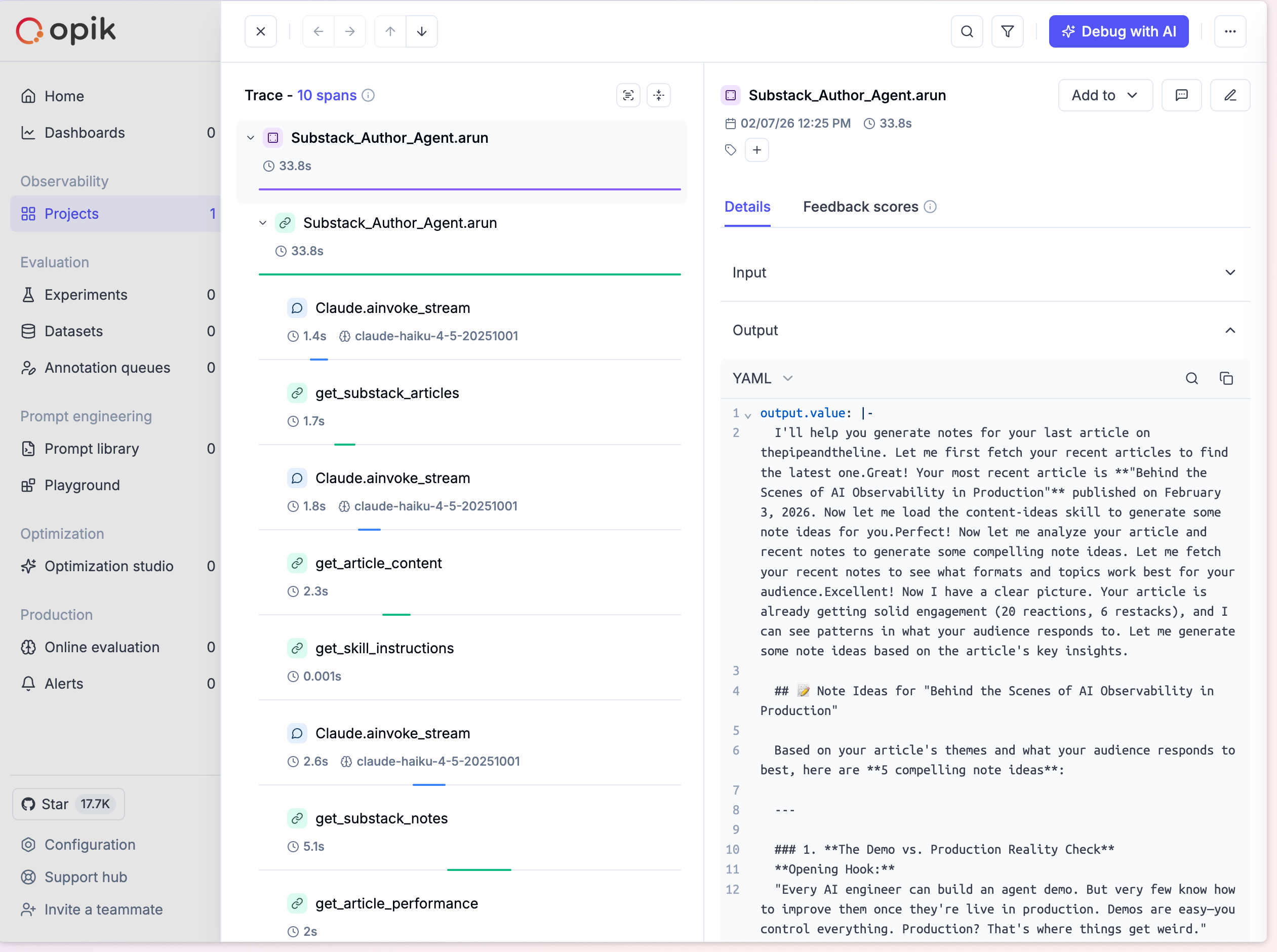
Then you can deep dive on the tool calls:
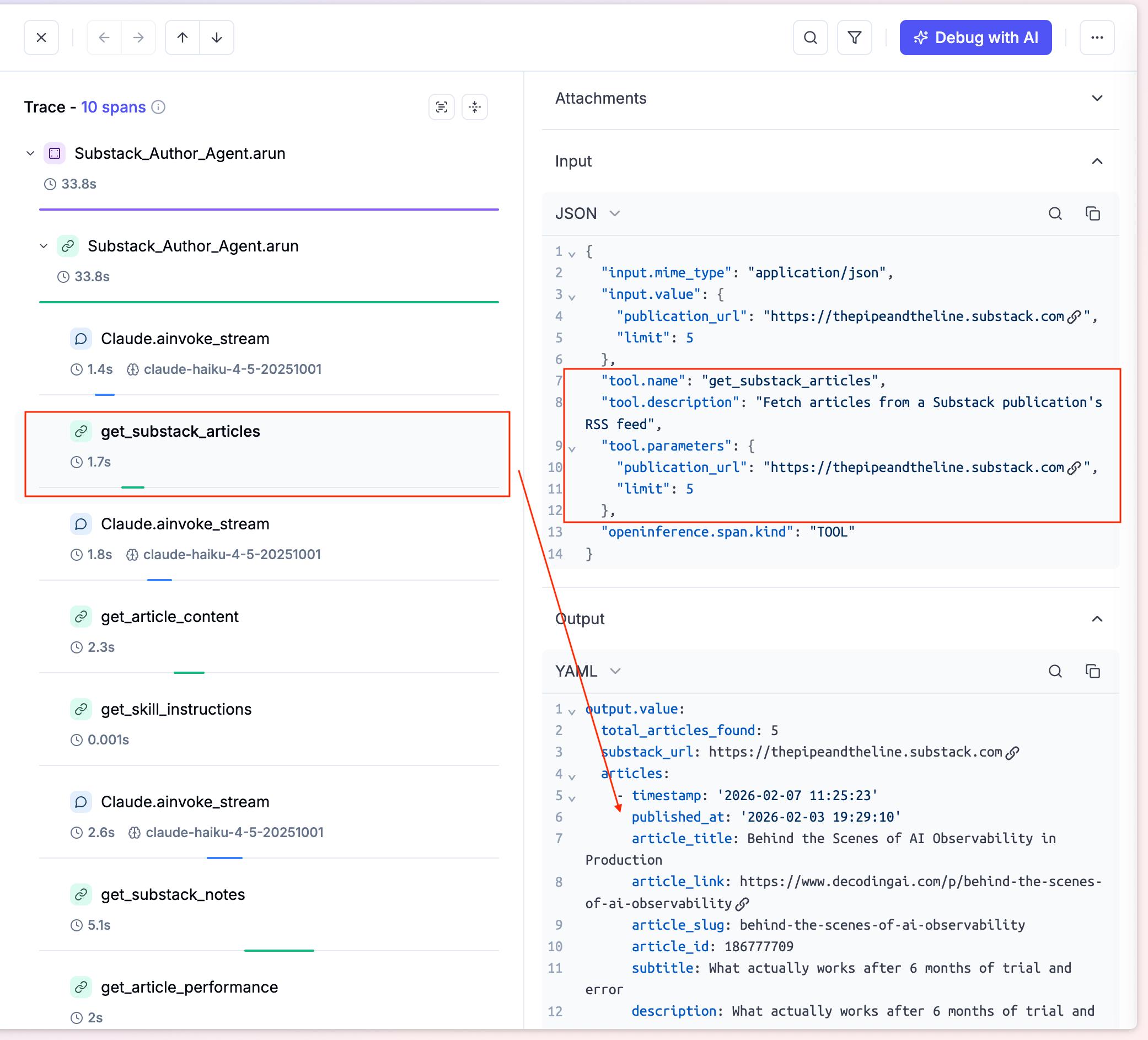
Click any tool span and you see the full detail:
Input Parameters:
{
  “publication_url”: “https://thepipeandtheline.substack.com”,
  “limit”: 5
}
Output Response: Complete JSON with article metadata, engagement metrics, and content.
This level of visibility is critical for production agents. You can see exactly what went wrong and where.
Then you can see SKILL loading by Agno, which behind the scenes is treated as a tool call:
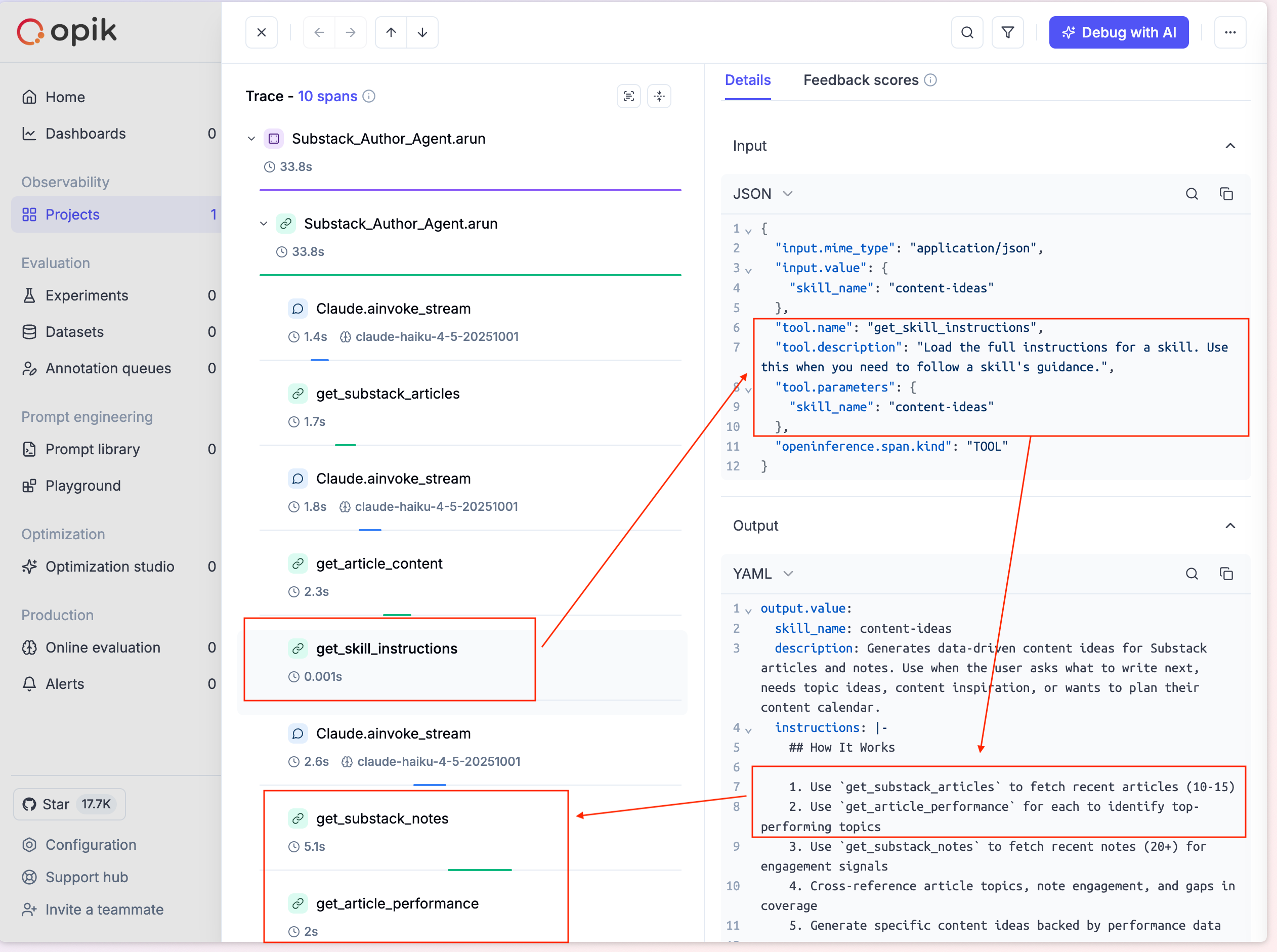
This is where SKILLs shine. The get_skill_instructions call shows:
Trigger: Agent recognized “generate notes ideas” matches the `content-ideas` skill
Action: Fetched the full SKILL.md file from
skills/content-ideas/Result: The skill’s complete instructions (tool sequence, analysis framework, output format) loaded into the agent’s context
Key insight: The system prompt stays clean. The skill loads on demand. When the conversation moves to a different topic, this skill’s instructions disappear and a different one loads.
That’s progressive disclosure in action. The SKILLs article explained the theory. This is the practice.
What This Solves
Compare this to what I used to do:
Before SKILLs: Write a long system prompt with instructions for every possible workflow. The agent sees all instructions all the time, causing context rot over multi-turn conversations.
With SKILLs: One-line system prompt. The agent loads exactly the instructions it needs, exactly when it needs them. Clean context. No pollution.
Bonus: Exposing the Agent as an MCP Server
This is where it gets interesting. The agent uses MCP tools, but it can also BE an MCP server.
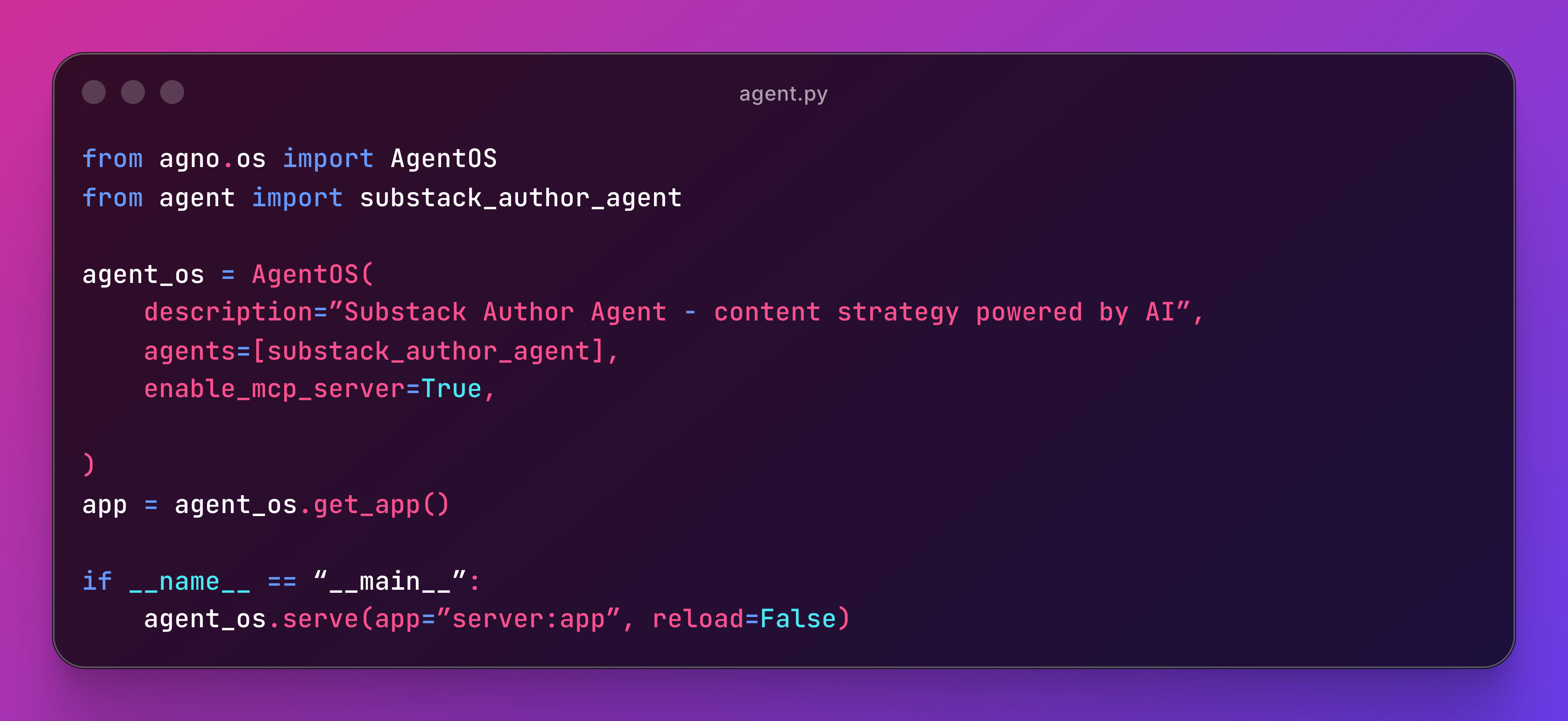
Run `python server.py` and you get an MCP endpoint at `http://localhost:7777/mcp` with a `run_agent` tool.
Now any MCP client (Claude Code, Cursor, another agent) can call your agent as a single tool. All 5 skills, 6 MCP tools, and the orchestration logic packaged into one `run_agent` call.
An agent that uses MCP and becomes MCP. The consumer doesn’t need to know about the 5 skills or 6 tools underneath. They just ask a question.
Resources: AgentOS As MCP Server
Try It Yourself
GitHub: https://github.com/aboyalejandro/substack-author-agent
Ask it:
“Analyze my note performance for https://yourpublication.substack.com”
“What should I write next based on my top articles?”
“Extract my writing voice from my last 5 articles”
If you enjoyed the content, hit the like ❤️ button, share, comment, repost, and all those nice things people do when like stuff these days. Glad to know you made it to this part!

Hi, I am Alejandro Aboy. I am currently working as a Data Engineer. I started in digital marketing at 19. I gained experience in website tracking, advertising, and analytics. I also founded my agency. In 2021, I found my passion for data engineering. So, I shifted my career focus, despite lacking a CS degree. I’m now pursuing this path, leveraging my diverse experience and willingness to learn.
Hi, can these skills be used to analyze newsletters across substack or for applicable to personal newsletters only?
Thanks for a detailed article...so the Skills is loaded only when the agent recognised the context ...what happens if it encounters a scenario not in the specific context